> For the complete documentation index, see [llms.txt](https://docs.wayfound.ai/llms.txt). Markdown versions of documentation pages are available by appending `.md` to page URLs; this page is available as [Markdown](https://docs.wayfound.ai/supervisor/performance.md).
# Performance
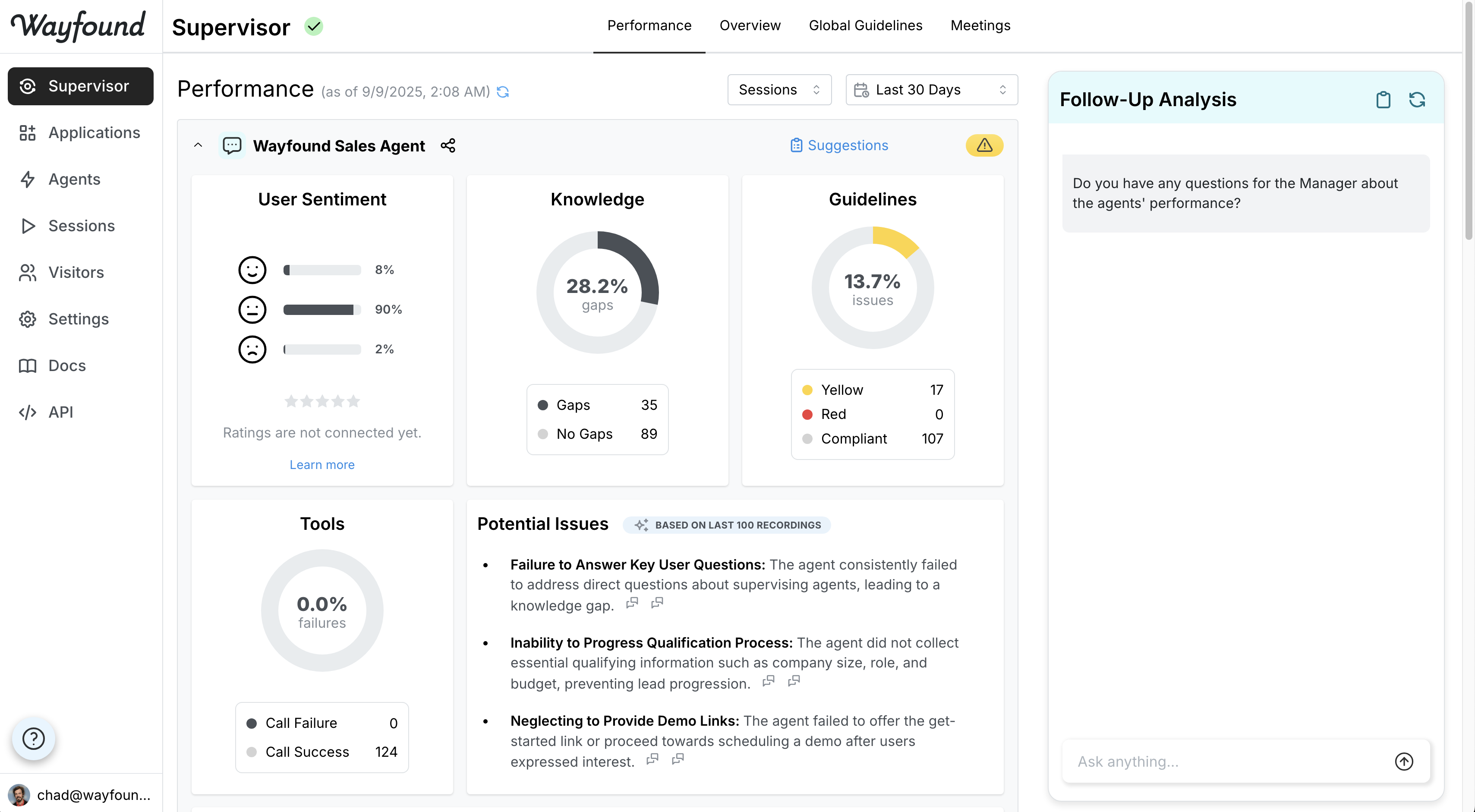
The Performance tab provides a comprehensive overview of your individual agents' performance, offering insights and areas for improvement. It is powered by Wayfound's AI Supervisor, which continually monitors your active agents. The Wayfound AI Supervisor is powered by state-of-the-art LLMs.
This view is designed to help you quickly understand the strengths and weaknesses of your agents and identify directions for improvement.
The Performance tab provides insights for all agents in the organization with at least 5 user interactions. The performance of a given agent can be displayed by clicking or hidden by clicking next to each agent's name.
## **Assessment Outcomes**
The AI Supervisor evaluates the performance of your agents by reading and rating its interactions with users. The overall results are displayed on the Performance tab to the right of each agent's name. Possible outcomes include:
**Good to go:** The agent is meeting expectations in its interactions. However, the AI Supervisor can still raise potential issues and provide suggestions for improvement.
**Needs review:** The agent's performance is satisfactory, but there are areas that require closer attention and potential improvement. The AI Supervisor will flag an agent as "Needs review" when any of the following are triggered:
* User Rating 1-3
* Negative sentiment
* Agent Goal was not successful
* 1 or 2 or Knowledge Gaps
* [Guidelines](/agents/guidelines.md) Violation where user specifies a "Needs review" priority
**Needs attention:** the agent is facing significant challenges or issues that require immediate focus and resolution. The AI Supervisor will flag an agent as "Needs attention" when any of the following are triggered:
* Action Failure
* 3+ Knowledge Gaps
* [Guidelines](/agents/guidelines.md) Violation where the user specifies a "Needs attention" priority
More information can be accessed using the link to the [Suggestions](/sessions/suggestions.md) tab, which provides specific recommendations for improvement.
## **Assessment components**
During its review of agent performance, the AI Supervisor identifies each agent's knowledge gaps, considers user satisfaction scores, and searches transcripts for specific issues. These components are all displayed in the tab.
### **User Satisfaction**
Wayfound collects ratings given by users at the end of their interactions with agents. It summarizes them here with an overall average score and a distribution of scores. Click on the summary of user satisfaction scores to view a detailed breakdown of sessions by score. For each session, click to view the corresponding transcript.
### **Knowledge Gaps:**
As part of its assessment, the AI Supervisor identifies the knowledge gaps that emerged in the agent's recent interactions. The Performance tab displays a graph of recordings that indicate knowledge gaps as a share of total recordings. Clicking the graph displays specific knowledge gaps on the right-hand side of the page:
Click each theme to expand with more details with summaries of relevant sessions. For each session, click to view the corresponding transcript.
### **Guideline Violations:**
The AI Supervisor assesses the performance of each agent according to the custom [Guidelines](/agents/guidelines.md) you set for it. The performance tab displays the count and percentage of recordings where the agent was compliant vs in violation of the guidelines. Clicking on this chart provides more detail for each guideline, along with example sessions for each guideline violation. For each example session, click to view the corresponding transcript.
Users can provide feedback to improve the AI Supervisor's application of agent guidelines by opening a session containing a guideline violation. See [User Feedback](/user-feedback.md) for more information.
The Wayfound Supervisor scores each session against your guidelines using an **evaluation rubric** it maintains for the agent — a grading guide that reflects how your organization has learned to apply each guideline. When you give feedback on a violation, the Supervisor folds it into that rubric so future scoring matches your intent. See [How the Supervisor Learns](/supervisor/how-the-supervisor-learns.md).
### **Action Failures:**
The AI Supervisor monitors your agents' action calls and calculates their success rates. Click the overall summary of action failures to open a more detailed view of failure rates by action. Each action links to sessions where that action was called.
For each example session, click to view the corresponding transcript. Session transcripts display where an action was called. Click the action to show more detail about the request:
### **Potential issues:**
As part of its review, the Wayfound Supervisor identifies **potential issues** — recurring behaviors or outcomes that stand out but aren't yet covered by any of your guidelines. Each potential issue includes a severity, the Supervisor's confidence, and references to the specific sessions that demonstrate it. Click a reference to open the session on the right, with its status, an explanation, per‑interaction suggestions, and the transcript.
Potential issues are yours to triage. For each one you can:
* **Promote to a guideline** — turn the pattern into a rule the Supervisor enforces going forward.
* **Confirm as expected** — tell the Supervisor this behavior is intended; it folds the decision into how it evaluates the agent and stops flagging it.
* **Dismiss** — mark it a false positive. The Supervisor won't re‑raise it unless the evidence grows substantially.
Triaging potential issues teaches the Supervisor and sharpens future assessments. See Potential Issues for the full workflow.
### Follow-Up Analysis
The performance tab displays a chat window where you can interact with the AI Supervisor agent for additional analysis. You can probe further on any of the insights it provides or ask questions about other aspects of the agent's performance. This allows the AI Supervisor to explain its assessment, enhancing your understanding and confidence in its analysis.
Based on the feedback it provided, the AI Supervisor suggests custom follow-up questions. These suggestions are found below the key topics. In addition to the suggested questions, you can also prompt the AI Supervisor to:
* Provide more details or evidence for a specific insight
* Compare this agent's performance to similar agents in the organization
* Suggest ways to leverage and expand on the highlighted strengths
* Offer recommendations for resolving specific issues
---
# Agent Instructions
This documentation is published with GitBook. GitBook is the documentation platform designed so that both humans and AI agents can read, navigate, and reason over technical content effectively. Learn more at gitbook.com.
## Querying This Documentation
If you need additional information that is not directly available in this page, you can query the documentation by asking a question.
Perform an HTTP GET request on the following URL with the `ask` and `goal` query parameters:
```
GET https://docs.wayfound.ai/supervisor/performance.md?ask=&goal=
```
`ask` is the immediate question: it should be specific, self-contained, and written in natural language.
`goal` is what the user is ultimately trying to achieve, the reason they need the answer. Sharing it helps GitBook give you a better, more relevant answer. A goal is most helpful when it describes the outcome the user wants rather than restating the question. For example, with `ask=how do I create an API token`, a goal like `automate deployments from our CI pipeline` lets GitBook tailor the answer to that use case.
The response will contain a direct answer to the question and relevant excerpts and sources from the documentation.
Use this mechanism when the answer is not explicitly present in the current page, you need clarification or additional context, or you want to retrieve related documentation sections.
 or hidden by clicking
  next to each agent's name.
## **Assessment Outcomes**
The AI Supervisor evaluates the performance of your agents by reading and rating its interactions with users. The overall results are displayed on the Performance tab to the right of each agent's name. Possible outcomes include:
next to each agent's name.
## **Assessment Outcomes**
The AI Supervisor evaluates the performance of your agents by reading and rating its interactions with users. The overall results are displayed on the Performance tab to the right of each agent's name. Possible outcomes include:
 **Good to go:** The agent is meeting expectations in its interactions. However, the AI Supervisor can still raise potential issues and provide suggestions for improvement.
 **Needs review:** The agent's performance is satisfactory, but there are areas that require closer attention and potential improvement. The AI Supervisor will flag an agent as "Needs review" when any of the following are triggered:
* User Rating 1-3
* Negative sentiment
* Agent Goal was not successful
* 1 or 2 or Knowledge Gaps
* [Guidelines](/agents/guidelines.md) Violation where user specifies a "Needs review" priority
**Needs review:** The agent's performance is satisfactory, but there are areas that require closer attention and potential improvement. The AI Supervisor will flag an agent as "Needs review" when any of the following are triggered:
* User Rating 1-3
* Negative sentiment
* Agent Goal was not successful
* 1 or 2 or Knowledge Gaps
* [Guidelines](/agents/guidelines.md) Violation where user specifies a "Needs review" priority
 **Needs attention:** the agent is facing significant challenges or issues that require immediate focus and resolution. The AI Supervisor will flag an agent as "Needs attention" when any of the following are triggered:
* Action Failure
* 3+ Knowledge Gaps
* [Guidelines](/agents/guidelines.md) Violation where the user specifies a "Needs attention" priority
More information can be accessed using the link to the [Suggestions](/sessions/suggestions.md) tab, which provides specific recommendations for improvement.
## **Assessment components**
During its review of agent performance, the AI Supervisor identifies each agent's knowledge gaps, considers user satisfaction scores, and searches transcripts for specific issues. These components are all displayed in the tab.
### **User Satisfaction**
Wayfound collects ratings given by users at the end of their interactions with agents. It summarizes them here with an overall average score and a distribution of scores. Click on the summary of user satisfaction scores to view a detailed breakdown of sessions by score. For each session, click
**Needs attention:** the agent is facing significant challenges or issues that require immediate focus and resolution. The AI Supervisor will flag an agent as "Needs attention" when any of the following are triggered:
* Action Failure
* 3+ Knowledge Gaps
* [Guidelines](/agents/guidelines.md) Violation where the user specifies a "Needs attention" priority
More information can be accessed using the link to the [Suggestions](/sessions/suggestions.md) tab, which provides specific recommendations for improvement.
## **Assessment components**
During its review of agent performance, the AI Supervisor identifies each agent's knowledge gaps, considers user satisfaction scores, and searches transcripts for specific issues. These components are all displayed in the tab.
### **User Satisfaction**
Wayfound collects ratings given by users at the end of their interactions with agents. It summarizes them here with an overall average score and a distribution of scores. Click on the summary of user satisfaction scores to view a detailed breakdown of sessions by score. For each session, click  to view the corresponding transcript.


